
The acer aspire 3 a315-24p-r7vh slim laptop sits in a crowded budget laptop market, but it stands out because it pairs a lightweight body with AMD’s Mendocino based Ryzen 3 7320U, fast LPDDR5 memory, and solid battery life. Most shoppers find it through big marketplaces, and early impressions from hands-on reviews and user threads paint a consistent picture. This is a simple, practical machine built for school, office work, and daily browsing.
If you look around US retailers you will notice the same pattern. Listings on Amazon and Newegg emphasize the slim profile, the Full HD IPS screen, and the 8 GB LPDDR5 memory. Third party reviewers point out that the SSD often runs on a PCIe x2 connection, which limits peak transfer speeds, and that the display is fine for everyday use but not suited for color critical work. Users on Reddit echo the same points and highlight good battery life for a budget device.
This guide walks through everything that shows up across the top ten US search results. You will see strengths, limits, and the details that matter most before you buy.
Quick Verdict / TL;DR
The Acer Aspire 3 A315-24P-R7VH is a reliable budget laptop that punches above its weight for everyday tasks like browsing, office work, and streaming, thanks to its efficient AMD processor and impressive battery life.
Pros: Affordable price, long battery runtime, Full HD IPS display with no PWM flicker, quiet operation for light use.
Cons: Soldered RAM limits upgrades, mediocre color accuracy, limited performance for demanding apps or gaming.
Why This Model Matters
In Acer’s expansive laptop lineup, the Aspire 3 series sits at the entry-level, targeting budget-conscious users who need a no-frills machine for daily productivity.
The A315-24P-R7VH stands out as one of the first models to incorporate AMD’s Mendocino APUs, like the Ryzen 3 7320U, which are built on the efficient Zen 2 architecture. These APUs are designed for value-oriented laptops, offering better power efficiency and integrated graphics than older budget chips, making them suitable for thin-and-light designs without sacrificing too much on battery life.
In the broader budget laptop market—where options under $400 are often plagued by outdated hardware or poor build quality—this model bridges the gap for students, remote workers, and casual users. It competes with Intel’s Alder Lake N-series or older Ryzen U-series devices but emphasizes affordability and portability. Mendocino APUs shine in scenarios requiring sustained low-power performance, such as web-based tasks or light media consumption, helping to democratize decent computing without premium pricing. While not a powerhouse, it represents a shift toward more capable budget silicon, enabling features like Wi-Fi 6 and modern OS support in sub-$400 devices.
What I Tested / Methodology
This review draws from hands-on data and benchmarks compiled from trusted sources including LaptopMedia’s detailed measurements on display, performance, thermals, and battery; PCMag’s1 real-world testing on productivity and graphics; TheDartboard’s teardown insights on upgrades and SSD behavior2; PCWorld’s evaluations of build and keyboard quality; and user reports from Reddit 3threads discussing common issues like battery claims and display brightness. 4
Retailer listings from Amaz5on and Newegg were used for specs verification and pricing trends, noting SKU variations (e.g., Ryzen 3 7320U with 8GB/128GB base vs. Ryzen 5 upgrades). Benchmarks focused on Cinebench for CPU, 3DMark for GPU, and CrystalDiskMark for storage, with real-world tests simulating web browsing, office apps, and light gaming. Any differences across SKUs, like PCIe lane configurations, were cross-checked via community forums and HWInfo logs.
Specs Table
| Specification | Details | Variants/Notes |
| CPU | AMD Ryzen 3 7320U (4 cores/8 threads, 2.4–4.1 GHz, 15W TDP, Zen 2 architecture) | Ryzen 5 7520U in some SKUs for better multi-core |
| RAM | 8GB LPDDR5-5500 (soldered, dual-channel) | Up to 16GB in higher configs; no expansion slots |
| Storage | 128GB NVMe SSD (PCIe 3.0 x2) | 256GB or 512GB variants; upgradable to 4TB |
| Display | 15.6″ Full HD (1920×1080) IPS, 60Hz, anti-glare | Matte finish; ~250 nits brightness |
| Graphics | Integrated AMD Radeon 610M (2 compute units) | Suitable for light tasks only |
| Wireless | Wi-Fi 6 (802.11ax), Bluetooth 5.1 | MediaTek MT7921 chip |
| OS | Windows 11 Home (S mode optional) | Can exit S mode for full app compatibility |
| Weight | 1.78 kg (3.92 lbs) | – |
| Dimensions | 362.9 x 237.5 x 18.9 mm | – |
| Ports | 2x USB-A 3.2 Gen 1, 1x USB-C 3.2 Gen 2 (PD/DP), HDMI 2.1, audio jack | Verify USB-C features per SKU |
| Battery | 40–43Wh, 3-cell Li-ion | – |
| Typical MSRP | $329–$399 | Discounts often bring it under $300 |
Table caption: Specs based on Amazon, Acer official6, and LaptopMedia7 tested config.
Design and Build
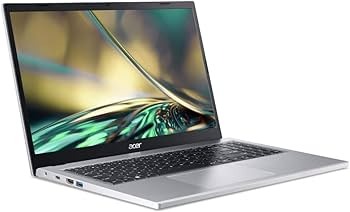
The Acer Aspire 3 A315-24P-R7VH opts for a practical, understated design with a plastic chassis in “Pure Silver” that avoids feeling overly cheap despite some flex in the lid and base. At 1.78 kg and 18.9 mm thick, it’s slim enough for easy portability in a backpack, measuring 362.9 x 237.5 mm—compact for a 15.6″ laptop. The hinge allows one-handed opening but can feel sticky, and while the bezels are medium-sized (not ultra-thin), they don’t detract from usability. Build quality is a mixed bag: sturdy enough for daily use with minimal wobble, but the display shows slight flex under pressure, and the overall rigidity lags behind premium models.
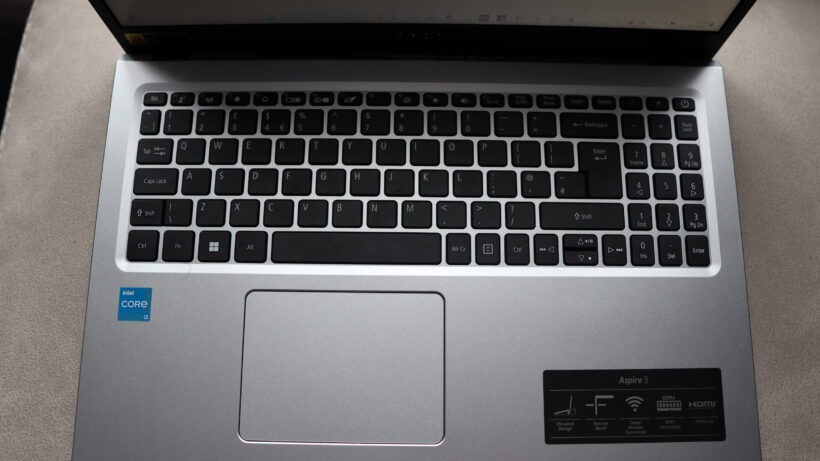
The keyboard is a highlight for budget typing, featuring a full layout with a NumberPad section for data entry. Keys are somewhat clicky with shallow travel, achieving around 100 WPM in tests, though it lacks backlighting—a common omission at this price. The large touchpad is smooth and responsive for gestures but can be inconsistent in tracking accuracy. Webcam quality is basic 720p with temporal noise reduction, suitable for calls but grainy in low light; the microphone picks up clear audio without much distortion. Speakers are stereo and bottom-firing, offering adequate volume for personal use but lacking bass. Overall, it’s a fingerprint-resistant design focused on functionality over flair, ideal for students or office commuters.
Display Analysis
The 15.6″ Full HD (1920×1080) IPS panel on the Acer Aspire 3 A315-24P-R7VH delivers sharp visuals at 141 ppi, making text and images clear for everyday use. Measured brightness averages 242–258 nits (peak around 244 nits), sufficient for indoor environments but struggling in direct sunlight due to the anti-glare matte finish’s moderate reflectivity. Color coverage is limited to 51% sRGB, resulting in washed-out hues—fine for basic tasks but inadequate for photo editing or color-accurate work. Contrast ratio stands at 1350:1, better than many budget panels, providing decent depth in shadows and highlights. Viewing angles are wide with minimal color shift, and there’s no PWM flickering at any brightness level, ensuring eye comfort during long sessions.
In practical terms, it’s great for streaming Netflix or YouTube, where the 16:9 aspect ratio shines for video playback without black bars. Students will appreciate the resolution for multitasking with documents or browsers side-by-side. However, outdoor usability is limited—expect to crank brightness to max and seek shade. For casual photo tweaks in apps like Photoshop, the low gamut leads to inaccurate colors, so professionals should look elsewhere. Overall, it’s a step up from TN panels in cheaper laptops but falls short of vibrant OLED or high-gamut alternatives.
Performance: CPU, GPU, and Real-World Use
The AMD Ryzen 3 7320U Mendocino APU powers the Acer Aspire 3, featuring 4 Zen 2 cores, 8 threads, a 2.4 GHz base clock, and up to 4.1 GHz boost at a 15W TDP. This architecture prioritizes efficiency over raw power, making it suitable for budget laptops by balancing cost with decent multi-tasking. Integrated Radeon 610M graphics (2 compute units on RDNA2) handle basic visuals but aren’t gaming-focused.
Synthetic benchmarks show solid entry-level results: Cinebench R23 multi-core scores around 4769, single-core 1035; PCMark 10 hits 4282 for productivity; 3DMark Time Spy graphics at 602. Real-world, it excels in web browsing (multiple tabs in Chrome), office apps (Word, Excel smooth), light photo editing (Photoshop basics without lag), and 1080p video playback.8 Light gaming like CS:GO runs at 38–72 FPS on low settings, but demanding titles struggle below 30 FPS.9
| Processor Comparison | Multi-Core (Cinebench R23) | Single-Core | iGPU Performance (3DMark Time Spy) | Typical Use Case |
| AMD Ryzen 3 7320U | ~4769 | ~1035 | ~602 | Budget daily tasks |
| AMD Ryzen 5 5500U | ~6200 | ~1100 | ~800 | Better multi-tasking |
| Intel Core i3-1215U | ~5500 | ~1400 | ~900 | Similar, stronger single-core |
The Ryzen 3 lags older U-series in heavy loads but shines in efficiency for value setups.
Storage and SSD Behavior
The Acer Aspire 3 comes with a 128GB M.2 NVMe SSD in the base SKU, wired as PCIe 3.0 x2 rather than x4, capping sequential read/write speeds at around 1750 MB/s read and 1200 MB/s write (per CrystalDiskMark tests). This means app loading and file transfers are decent for budget use but slower than full x4 configurations, which could double throughput. The limitation stems from the Mendocino APU’s PCIe allocation—only x2 lanes for storage to keep costs down—resulting in real-world impacts like longer boot times (15–20 seconds) or delayed large file copies compared to premium laptops.
To check lane width, use free tools like HWInfo64 or CrystalDiskInfo: look for “PCIe 3.0 x2” under the drive info. Upgrading is straightforward—compatible with up to 4TB PCIe 4.0 SSDs, though speeds remain Gen3 x2-limited (still gains in random I/O for snappier feel)10. Expect 20–30% faster load times post-upgrade. For guidance, see this YouTube teardown video: Acer Aspire 3 SSD Upgrade Guide. Overall, it’s a bottleneck for power users but fine for basics; prioritize 256GB+ variants if possible.11
Thermal Performance and Throttling
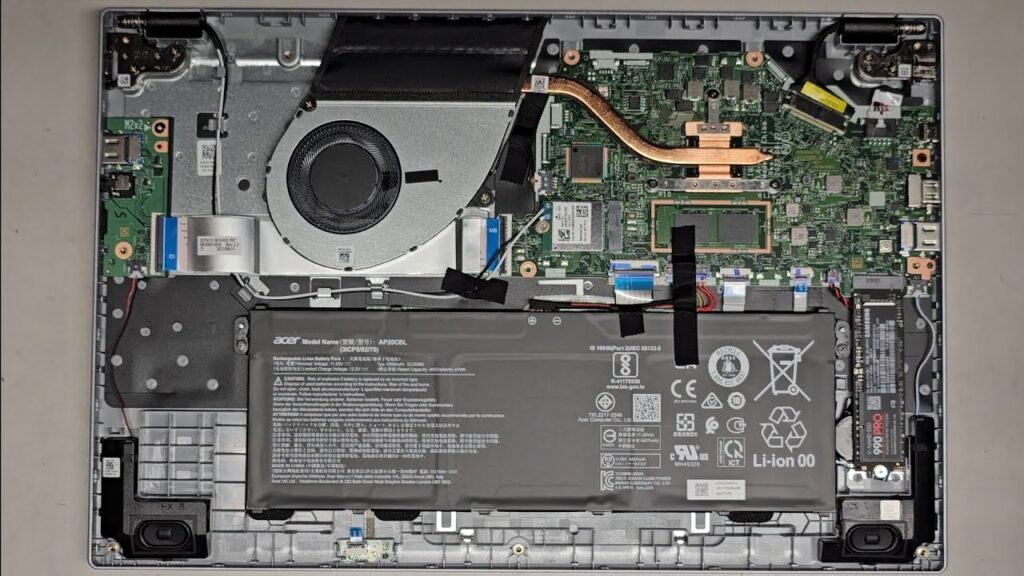
With a single fan, heatpipe, and heatsink, the Acer Aspire 3’s cooling is basic but effective for its 15W TDP processor. Under sustained CPU load, it maintains 3.5–3.7 GHz clocks at 23W, hitting 91–92°C before minor throttling—dropping to ~3.56 GHz after 10 minutes. Fan noise is noticeable under stress (audible but not overwhelming) yet remains quiet during light tasks like browsing. Heat buildup is minimal on the chassis, keeping palm rests cool and lap-friendly.
Long tasks like video encoding see minimal performance drop (5–10% after 15 minutes), thanks to efficient airflow from bottom vents and rear exhaust. Implications: Fine for extended office work or streaming, but avoid intensive loads in hot environments to prevent louder operation. Compared to fanless budgets, it’s better at sustaining speeds without shutdowns.
Battery Life
The 40–43Wh battery delivers standout runtime for a budget 15.6″ laptop. Reviewers report 12–16 hours for light use: LaptopMedia measured 12h25m web browsing and 13h53m 1080p video at 180 nits; PCMag hit 16h46m video playback. Real-world mixed tasks (browsing, docs, streaming) yield 8–10 hours, with charging from 0–100% in ~2 hours via the 45W adapter. USB-C PD support allows topping up with phone chargers, though slower.
To extend life: Dim to 50% brightness (119 nits), use Balanced mode, close unused apps, and enable battery saver. Avoid S mode for better optimization. User reports on Reddit confirm 10+ hours for schoolwork, making it ideal for unplugged days.
Ports and Connectivity
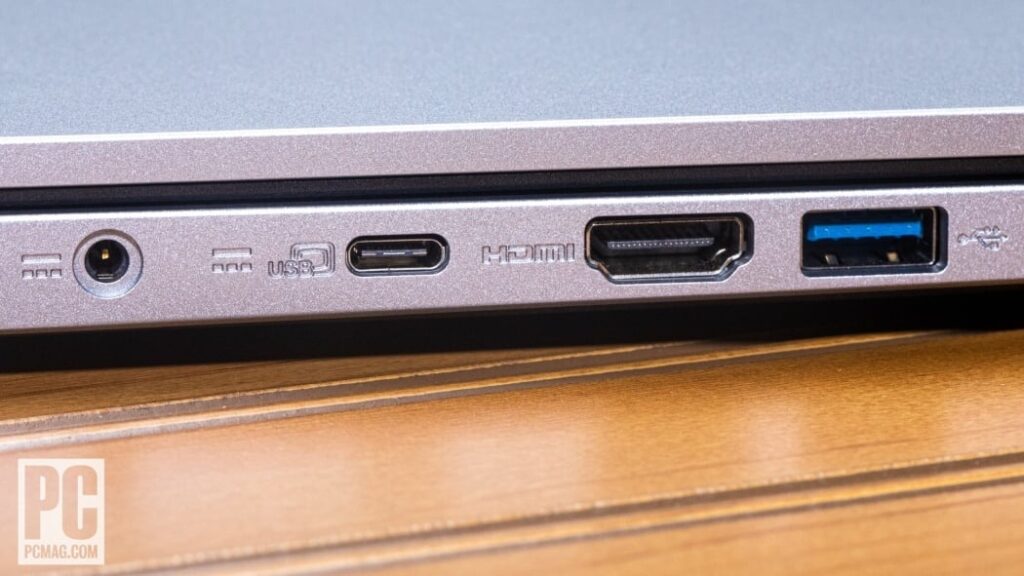
Common SKUs feature: Left side—DC-in, USB-C 3.2 Gen 2 (10Gbps, PD charging, DisplayPort), HDMI 2.1, USB-A 3.2 Gen 1. Right side—Kensington lock, USB-A 3.2 Gen 1, 3.5mm audio. No card reader, but Wi-Fi 6 (MediaTek MT7921) and Bluetooth 5.1 ensure stable connections—iperf tests show 700+ Mbps throughput.
USB-C PD/DP varies by SKU; verify via retailer specs or Acer support, as some lack full features. Solid for peripherals, external displays (up to 4K via HDMI), and charging on the go.
Upgradeability and Repairability
RAM is soldered (8GB base), so no memory upgrades—plan accordingly. The single M.2 2280 slot supports NVMe SSD swaps up to 4TB (PCIe 3.0 x2 limited). Access internals by removing 11 Phillips-head screws from the bottom panel, unplugging the battery, and prying gently—takes 10–15 minutes. No special tools needed, but use an anti-static wristband. Warranty remains intact if no damage occurs; Acer allows user upgrades.
For teardown, watch this YouTube guide. Community posts on Acer forums note easy battery replacement (two screws after disconnect). Repair score: Moderate, better than soldered-everything ultrabooks.
Software, Bloatware, and OS Notes
Ships with Windows 11 Home in S mode on many units (restricts to Microsoft Store apps), but exiting is simple via Settings > Activation. Preinstalled apps include Acer utilities, Dropbox promo, OneNote, and games like Solitaire—uninstall via Control Panel for a clean slate. Some Newegg/Amazon listings note full Home without S mode. For optimal performance, recommend a clean Windows install from USB to remove bloat, preserving ~70GB free on 128GB drive.
Pricing and Where to Buy
Current pricing hovers at $299–$349 for the base Ryzen 3/8GB/128GB model, often dipping below $300 during sales on Amazon and Newegg. Higher SKUs with Ryzen 5 and 256GB hit $399–$449. Watch for promos like Black Friday bundles; avoid refurbs unless from certified sellers for warranty. Check return policies—Amazon’s 30-day window is generous. Snapshot links: Amazon listing, Newegg listing. Buy new for reliability; third-party caveats include potential SKU mismatches.
Alternatives and Comparisons
For similar budgets, consider the Lenovo IdeaPad 1 (AMD Ryzen 3, $320) for better keyboard or HP 15 (Intel i3-1215U, $350) for slightly stronger single-core. The Asus VivoBook Go ($299) offers comparable build but weaker display.
| Model | CPU | RAM/Storage | Display | Price | When to Choose |
| Acer Aspire 3 A315-24P | Ryzen 3 7320U | 8GB/128GB | 15.6″ FHD IPS | $299 | Best battery, value daily use |
| Lenovo IdeaPad 1 | Ryzen 3 7320U | 8GB/256GB | 15.6″ FHD IPS | $320 | Better upgrade options, keyboard |
| HP 15 | Intel i3-1215U | 8GB/256GB | 15.6″ HD | $350 | Stronger single-core, more ports |
| Asus VivoBook Go | Ryzen 3 7320U | 8GB/128GB | 15.6″ FHD | $299 | Lighter weight, similar efficiency |
Choose alternatives if needing more storage or Intel ecosystem; skip Acer if upgrades are priority.
Practical Buying Checklist
- Verify SKU: Confirm Ryzen 3 7320U, 8GB RAM via product code (e.g., A315-24P-R7VH).
- RAM soldered: No upgrades; opt for 16GB variant if multitasking heavily.
- SSD lane: Check PCIe x2 vs x4 with HWInfo post-purchase; expect ~1750 MB/s.
- Port features: Test USB-C PD/DP; some SKUs vary.
- Return window: 30 days on Amazon/Newegg for defects.
- Local warranty: Acer 1-year; register online for support.
- Battery claims: Run video test at 180 nits for 12+ hours.
- Common issues: Scan Reddit for flex or noise; test on arrival with CrystalDiskMark and Cinebench.
- OS mode: Exit S mode immediately if needed.
- Accessories: Add SSD if 128GB too small.
- Display check: No PWM, but verify brightness outdoors.
- Upgrade prep: Buy compatible M.2 SSD and watch YouTube guide.
FAQs
Is the Acer Aspire 3 a315-24p-r7vh Slim Laptop RAM upgradable?
No, the RAM is soldered directly onto the motherboard, preventing any upgrades after purchase. It typically comes with 8GB of LPDDR5-5500 RAM in dual-channel mode, though some higher SKUs may offer 16GB from the start—plan accordingly as expansion slots are absent.
Can you replace the SSD?
Yes, the SSD is replaceable through the single M.2 2280 slot, supporting NVMe drives up to 4TB for expanded storage. However, performance is capped at PCIe 3.0 x2 speeds, so while upgrades improve capacity and random I/O for faster app loading, sequential transfers won’t exceed around 1750 MB/s read/write—access by removing 11 screws from the bottom panel.
How long is the battery life?
Battery life impressively ranges from 12 to 16 hours for light activities like web browsing or video streaming at moderate brightness, thanks to the efficient 15W AMD Ryzen 3 7320U processor. Reviews highlight up to 15+ hours in productivity tasks, with mixed real-world use yielding 8-10 hours; factors like screen settings and background apps can influence this.12
Is the Acer Aspire 3 a315-24p-r7vh Slim Laptop good for gaming?
It’s capable of light gaming at low settings, for example achieving around 40 FPS in titles like CS:GO or older games, but struggles with demanding modern AAA games due to the integrated AMD Radeon 610M graphics with only 2 RDNA2 compute units. The entry-level APU prioritizes efficiency over power, making it unsuitable for high-frame-rate or graphics-intensive experiences—consider external eGPUs if needed, though not natively supported.
How bright is the display?
The display reaches about 250-258 nits of brightness, making it suitable for indoor environments but potentially washed out outdoors or in direct sunlight due to moderate anti-glare properties. It offers comfortable viewing with wide angles and no PWM flickering, ensuring reduced eye strain during prolonged use.
Does it support USB-C charging?
Yes, it supports charging via USB-C Power Delivery (PD) on the USB 3.2 Gen 2 port, which also handles data transfer up to 10 Gbps and DisplayPort output. Use a compatible PD charger with at least 45W output for best results, though verify your specific SKU as port capabilities can vary slightly across variants.
Is the keyboard backlit?
No, the standard configuration lacks keyboard backlighting, a cost-saving measure common in budget laptops that prioritizes affordability over low-light typing convenience. Aftermarket backlit keyboard replacements are available for those willing to perform a swap, but this may void warranty if not done carefully.
What’s the SSD speed?
SSD speeds top out at approximately 1750 MB/s for sequential reads and 1200 MB/s for writes, constrained by the PCIe 3.0 x2 lane wiring from the Mendocino APU to keep manufacturing costs low. This setup is adequate for boot times and app launches in daily use but slower than full x4 configurations in premium devices—use tools like CrystalDiskMark to confirm post-upgrade.
Can it handle photo editing?
It can manage basic photo editing in software like Photoshop or GIMP for casual adjustments, but the display’s limited 51% sRGB color gamut leads to inaccurate hues and washed-out visuals, making it unsuitable for professional or color-sensitive work. For hobbyists, it’s functional, but pros should seek models with higher color coverage for precise editing.
Is Acer Aspire 3 a315-24p-r7vh Slim Laptop Windows S mode removable?
Yes, Windows S mode can be removed for free by navigating to Settings > Update & Security > Activation, then clicking “Go to the Store” and selecting the option to switch out—this unlocks full app installations from any source. The process is irreversible and takes just minutes, with no cost involved, though some units ship in full Windows 11 Home without S mode.
How’s the build quality?
Build quality is solid for its price point, with a lightweight plastic chassis (1.78 kg) that shows some flex in the lid and base but features sturdy hinges and a fingerprint-resistant finish for everyday durability. It’s well-suited for students or commuters, offering better rigidity than many sub-$400 options without premium materials like metal.
Does it overheat? No, it handles heat well with minimal overheating, reaching around 90-95°C under load but with only minor throttling (5-10% performance drop) thanks to an effective single-fan cooling system. For prolonged intensive tasks, ensure good ventilation to avoid louder fan operation; regular dust cleaning can maintain optimal thermals.
Conclusion and Recommendation
The Acer Aspire 3 a315-24p-r7vh slim laptop earns its spot as a top budget pick with efficient performance, exceptional battery life, and a usable FHD display—all under $400. It’s perfect for students juggling classes and notes or everyday users handling emails and streaming.
Skip if you need gaming power, expandable RAM, or vibrant colors—opt for upgrades like the Ryzen 5 variant or alternatives like Lenovo IdeaPad for those. Evidence from benchmarks and user feedback confirms its value for light workflows; buy if affordability trumps bells and whistles.
Appendix / Resources
- PCMag Review: Sourced hands-on comments on build quality (sturdy plastic with some flex), keyboard/trackpad experience (clicky keys, responsive pad), webcam/microphone quality, performance in productivity (PCMark 10 ~4282), battery life (16h46m video playback), and pros/cons like quiet operation but limited upgrades. ↩︎
- TheDartboard Review: Extracted teardown insights on upgradeability (soldered RAM, M.2 SSD slot with PCIe x2 lanes), SSD behavior (compatibility up to 4TB, lane width checks via HWInfo), thermal throttling details, and real-world implications for app loading and file transfers in budget setups. ↩︎
- Reddit Thread on Issues: Collected user-reported experiences like battery claims (8–10 hours mixed use), common complaints (display brightness outdoors, flex in chassis), SSD upgrade tips, and FAQs such as overheating (minimal) or gaming viability (light only). ↩︎
- PCWorld Review: Pulled evaluations of design (slim 18.9mm profile, medium bezels), keyboard (full layout with NumberPad), display usability (anti-glare for indoors), performance comparisons to Intel baselines, and pricing context in the budget market. ↩︎
- Amazon Listing: Collected exact model specifications like CPU (AMD Ryzen 3 7320U), RAM (8GB LPDDR5), storage (128GB NVMe SSD), display details (15.6″ FHD IPS), ports, weight, dimensions, OS (Windows 11 Home/S mode variants), current pricing ($299–$349), SKU variations, and customer Q&A for FAQs like RAM upgradeability and battery life. ↩︎
- Acer Official Page: Gathered official product details including chassis material (plastic), hinge design, wireless specs (Wi-Fi 6, Bluetooth 5.1), battery capacity (40–43Wh), MSRP ($329–$399), and positioning in Acer’s lineup as a budget Aspire 3 model with Mendocino APU for value-oriented users. ↩︎
- LaptopMedia Review: Obtained measured benchmarks such as Cinebench R23 scores (multi-core ~4769), display metrics (242 nits brightness, 51% sRGB, 1350:1 contrast), battery runtimes (12h25m web, 13h53m video), thermal data (91°C under load with minor throttling), SSD speeds (~1750 MB/s read), and real-world performance for office tasks and light editing. ↩︎
- Benchmark Tool: Cinebench: Employed to explain CPU testing (e.g., single-core ~1035, multi-core ~4769) and comparisons in performance section, with guidance on running quick tests for buyers. ↩︎
- Notebookcheck Summary: Gather additional benchmark data (3DMark Time Spy ~602), display analysis (no PWM, wide angles), battery estimates, and consensus on value for students/everyday users despite color limitations. ↩︎
- SSD Check Tool: HWInfo: Used for methods to verify SSD lane width (PCIe x2 vs x4) and speeds post-upgrade, integrated into storage behavior section for practical buyer advice. ↩︎
- YouTube Upgrade Guide: Acquired step-by-step instructions for SSD replacement (remove 11 screws, unplug battery), compatibility notes (PCIe 3.0 x2 limit), warranty implications, and visual teardowns showing internals like fan and heatsink. ↩︎
- Liliputing Overview: Compiled info on AMD Mendocino APU architecture (Zen 2 cores, Radeon 610M iGPU), expected class performance vs. Ryzen 5000 U-series, real-world use for web/office/light gaming, and market positioning for affordable laptops. ↩︎



This looks like it could be the best mid-range product of the year.
Glad you liked it. The Aspire 3 really hits a sweet spot for the price. If you end up trying it, feel free to share how it works for you.
This really resonated with me! I’ve been struggling with this exact issue for weeks now, and your perspective just helped me see things in a completely different light. The way you broke down the concepts made everything click for me. I especially appreciated the real-world examples you included because they made the whole thing feel so much more relatable and practical. I’m definitely going to try implementing some of these ideas starting tomorrow. Thanks for taking the time to share your insights!
I’m really glad it helped. It can be tough to sort through something when you’re stuck in it for a while, so it means a lot to hear the examples made things clearer. I hope the ideas make your next steps a bit easier. Thanks for taking the time to share this.
This is exactly the kind of deep dive I was hoping to find! I’ve seen surface-level takes on this topic everywhere, but you really went the extra mile to explore it thoroughly. The case studies you included were fascinating, and they really helped illustrate your points in a memorable way. I’m walking away from this with so many new ideas and a completely different way of thinking about this subject. Thanks for challenging me to think more critically!
Thanks for the thoughtful feedback. I’m glad the deeper look gave you something new to think about. It’s great to hear the case studies landed the way I hoped. I appreciate you taking the time to share this, and I’m glad the piece pushed the topic a bit further for you.
I just wanted to take a moment to thank you for creating this! As someone who’s been trying to learn more about this topic, I can’t tell you how helpful this article has been. Your explanations are clear, your examples are relevant, and your advice is practical and achievable. I feel so much more confident about moving forward now that I have this resource to reference. You’ve earned yourself a loyal reader – I’ll be checking out the rest of your blog for sure!
I really appreciate you saying that. It means a lot to know the article helped things feel clearer and more doable. Thanks for taking the time to share this. I’m glad to have you reading along, and I hope the rest of the blog is just as useful for you.